Robotics
14-17
Medium
Robotic Arm with Computer Vision
An Arduino-powered robotic arm integrated with OpenCV to detect and pick objects based on color.
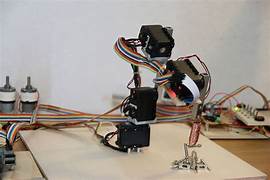
Project Instructions
1. Assemble a 4DOF robotic arm kit.
2. Connect servo motors to Arduino Mega.
3. Attach a webcam above the workspace.
4. Use Python (OpenCV) to detect colored objects (e.g., red ball).
5. Send serial commands from Python to Arduino to control the arm.
6. The arm picks and places the object in a defined location.
Materials Required
1. Arduino Mega
2. Robotic Arm Kit with Servos
3. USB Webcam
4.Computer with Python + OpenCV
5. Jumper wires + power supply
Circuit Diagram

Code & Programming
Python script processes camera frames → detects object position.
Arduino receives commands over serial → controls servos to move arm.
Video Tutorial
Tips & Tricks
Safety First: Always work in a well-lit area and keep your workspace organized.
Tools: Make sure you have all the required tools before starting the project.
Need Help: If you get stuck, check our FAQ section or contact our support team.

Ready to Build This Project?
Join our community and start building amazing robotics projects today!